
YouTube’s introduction of “Ask Studio” marks a significant step in empowering creators with AI-driven, personalized insights directly within YouTube Studio, the platform’s central hub for channel management and analytics. This new AI-powered assistant is designed to streamline content creation and channel optimization by offering intelligent, data-backed recommendations derived exclusively from a creator’s own channel performance and audience interactions.
What Is Ask Studio?
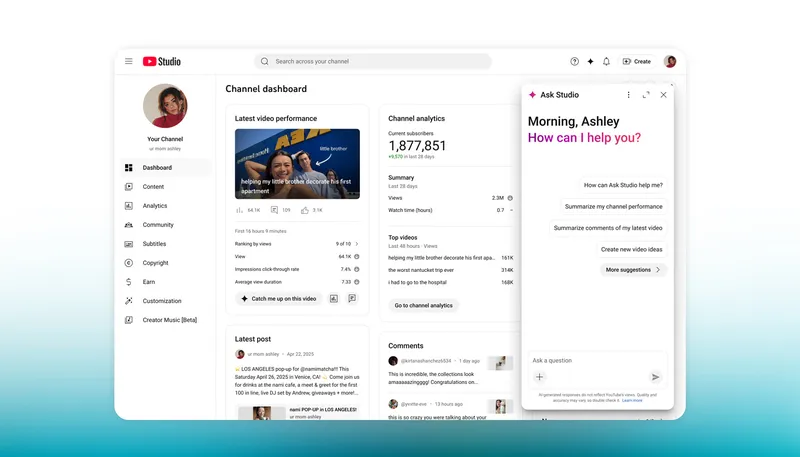
Ask Studio is an AI-powered conversational assistant integrated directly into YouTube Studio, designed to help creators gain real-time insights, strategic guidance, and data-driven recommendations—all through natural language queries. Think of it as a smart, on-demand analyst and creative consultant built right into your dashboard.
How to Access Ask Studio?
- Location: Look for a sparkle icon (✨) in the top-right corner of your YouTube Studio interface.
- Platform: Currently desktop-only—it’s not available on mobile devices.
- Availability: As of now, it’s in an experimental phase, primarily rolled out to English-language channels based in the U.S. Google may expand access to more regions and languages over time.
How does it work?
Ask Studio operates like a chatbot but is deeply integrated with your channel’s data. You can:
- Type free-form questions in plain English (e.g., “Why did my last video underperform?”).
- Use suggested prompts that appear to guide you, such as:
- “Summarize comments on my latest video.”
- “Analyze performance of ”
- “Suggest new video ideas based on my uploads”
The AI processes your request using your channel’s analytics, audience behavior, content history, and YouTube’s broader trends to generate personalized, actionable responses—not generic advice.
Key Features of Ask Studio:
Performance Analysis & Summarization
Ask Studio can interpret complex analytics—such as watch time, click-through rates (CTR), audience retention, and traffic sources—and distill them into clear, natural-language summaries. Instead of sifting through charts and tables, creators can ask questions like:
“Why did my last video underperform?” or “Which of my videos drove the most subscriber growth last month?”
The AI responds with concise, contextually grounded explanations based on the creator’s historical data.
Audience Comment Insights
The tool can analyze thousands of comments across a creator’s videos to identify recurring themes, sentiment trends, or frequently requested content. For example:
“What are viewers saying about my cooking tutorials?”
Ask Studio might respond: “Many viewers praised your step-by-step instructions but asked for more vegetarian recipes.”
This helps creators stay attuned to audience preferences without manually reading every comment
Content Ideation & Optimization Suggestions
Leveraging patterns in successful past content, Ask Studio can propose new video ideas or suggest improvements.
A creator might ask: What kind of video should I make next to boost engagement?
The AI could recommend: “Your audience engages most with ‘beginner-friendly’ tech reviews under 10 minutes—consider a video titled ‘Top 5 Budget Smartphones for Students in 2024.’”
Actionable, Personalized Recommendations
Unlike generic advice, Ask Studio’s insights are tailored to each channel’s unique metrics, audience demographics, and content history. It might suggest optimal upload times, title tweaks, or thumbnail strategies based on what has historically worked for that specific creator.
Privacy-Centric Design
YouTube emphasizes that Ask Studio operates only on a creator’s own data; it doesn’t compare channels or use external datasets. This ensures recommendations are relevant while maintaining data privacy and competitive fairness.
Why It Matters for Creators?
Time Savings: Automates data interpretation, freeing creators to focus on production.
Data Democratization: Enables advanced analytics to be accessible to creators without technical expertise.
Iterative Improvement: Encourages evidence-based decisions, helping channels grow sustainably.
Boosts Creativity: Bridges the gap between audience feedback and content planning.
Tips for Using Ask Studio Effectively
- Be specific in your questions (e.g., “Why did my cooking tutorial get fewer views than usual?”).
- Use it regularly—after publishing a video, during planning phases, or when reviewing monthly performance.
- Combine its insights with your own intuition—AI informs, but you create.
Availability and Integration
Ask Studio is integrated directly into YouTube Studio’s interface, accessible via a chat-like prompt box. It’s currently being rolled out gradually to select creators, with plans for broader availability pending user feedback and refinement.
Key Limitations of Ask Studio
Channel-Exclusive Data Only
- Ask Studio only analyzes your own channel’s data—it does not access:
- Competitor analytics (e.g., “How does my CTR compare to similar creators?”)
- Broader YouTube trends (e.g., “What’s trending in the tech niche this week?”)
- Cross-channel benchmarks or industry averages
- This means insights are highly personalized but contextually narrow. You won’t get external market intelligence—only what’s happening on your channel.
Limited Availability
- Geographic Restriction: Currently available primarily to creators in the United States.
- Language Support: Only supports English-language queries and responses—even if your channel is in another language.
- Eligibility: Not all U.S.-based English channels have access yet; it remains in an experimental (beta) phase, rolled out selectively by YouTube.
Desktop-Only Access
- Ask Studio is not available on mobile (neither in the YouTube Studio app nor mobile browsers).
- You must use a desktop or laptop browser to see the sparkle (✨) icon and interact with the tool.
No Real-Time External Data Integration
- While responses feel “real-time,” they’re based on YouTube’s internal data pipelines, which may have slight delays (e.g., analytics from the last 48 hours might not be fully processed).
- It cannot fetch live comments, breaking news, or sudden viral shifts outside your channel.
AI Interpretation Isn’t Perfect
- Though responses are generally accurate and helpful, the AI may occasionally:
- Misinterpret ambiguous questions
- Oversimplify complex analytics
- Miss nuanced context (e.g., a dip in views due to a personal break vs. algorithm changes)
Practical Value
This new AI feature is poised to save creators time on audience research, streamline content brainstorming, and provide more personalized recommendations to help boost engagement and performance with less manual work.
1. Saves Significant Time on Audience Research
- Before Ask Studio: Creators had to manually comb through comment sections, export analytics reports, and interpret metrics like audience retention curves or traffic sources—often requiring hours of effort.
- With Ask Studio:
→ Ask: “What are viewers saying about my last video?”
→ Get: A concise, AI-summarized overview of key sentiments, recurring questions, and notable feedback—in seconds. - Result: Faster understanding of audience preferences, pain points, and engagement patterns—without scrolling through thousands of comments.
2. Streamlines Content Brainstorming
- Instead of staring at a blank page or relying solely on intuition, creators can:
- Ask: “Suggest 5 video ideas based on my top-performing uploads.”
- Receive: Tailored topic suggestions grounded in actual viewer behavior (e.g., “Your audience watches longer on ‘how-to’ videos about budget cooking—consider ‘5 Pantry Meals Under $5’”).
- Unlike generic idea generators, Ask Studio’s suggestions are rooted in your channel’s unique performance history, increasing the likelihood of resonance and success.
3. Delivers Hyper-Personalized Recommendations
- Ask Studio doesn’t offer one-size-fits-all advice. It analyzes:
- Your watch time trends
- Click-through rates (CTR)
- Audience demographics
- Content format performance
- This level of personalization helps creators optimize strategy with precision, not guesswork.
4. Lowers the Barrier to Data Literacy
- Many creators—especially beginners—find YouTube Analytics overwhelming. Ask Studio translates metrics into plain language, making insights accessible regardless of technical expertise.
5. Encourages Iterative Improvement
- By enabling quick, conversational check-ins (“Why did this video underperform?”), Ask Studio fosters a test-learn-optimize cycle.
- Creators can rapidly adjust thumbnails, titles, pacing, or topics based on immediate feedback—accelerating growth through informed iteration.
YouTube’s Ask Studio is a game-changer for creators, turning complex analytics into instant, personalized insights that save time and spark smarter content. While limited to U.S. English channels on desktop for now, its channel-specific focus ensures relevant, privacy-safe advice. Embrace it to refine your strategy, understand your audience, and grow faster—AI isn’t replacing creativity, it’s supercharging it.